Fix, translate, and improve text instantly — anywhere you work.
OCR-powered. No copy-paste. Just press Cmd+C+C and it's done.
Works in every app — Slack, Gmail, Figma, docs, PDFs.
Free to start. No credit card.
Also available for Chrome — Try it freeSelect text anywhere on your desktop — Slack, Gmail, Figma, PDFs, and more.















Select text, press a shortcut, done. No app switching. No copy-paste. Just keep writing.
Highlight text anywhere on your desktop — emails, Slack, docs, browsers, Figma.
Double-press C while holding Cmd (or Ctrl on Windows). No mouse, no tab switching.
The corrected or translated text replaces the original inline. Press Cmd+Enter to apply.
This demo shows what your workflow looks like after using TextBoi.
Select the text below, then press Cmd+C+C — try it once and you'll immediately understand.
Simulated demo — results are pre-written to show how textBoi works.
Just got back from the team meeting. Everyone agreed the new feature should ship by Friday, but we still need to finalize the design and run a quick test before pushing it live.
🖥 Set the model and language first. Select text and press Cmd+C+C.
If you write daily, this will save you hours.
Download TextBoi and try it in your real workflow.
Download TextBoi FreeFree to start. No credit card.
Cmd+C+C works great for text you can highlight. But images, scanned PDFs, and locked interfaces are a different story — you can't select a single character.
TextBoi's built-in OCR reads the text visually, so you can fix or translate anything on your screen — no matter what app it's in.
See text in a screenshot? Drag to select the area — TextBoi reads it and fixes it instantly.
Non-selectable PDFs and image files are no longer an obstacle — OCR extracts every word.
Apps that block copy-paste aren't a problem. If you can see the text, TextBoi can read it.
DeepL can't do this · Grammarly can't do this · TextBoi can.
Cmd+Shift+C to enter capture mode, drag over any text on screen — even from images or locked apps — and TextBoi reads and fixes it instantly.
Real app demo
Here's how OCR capture works in the actual TextBoi app. Notice how it reads text from a screenshot — no copy-paste, no retyping.
Interactive demo
Cmd+Shift+C or click the button below, then drag over any part of the email to simulate the OCR workflow.
From: Sarah Chen <[email protected]>
Q2 Campaign Results
Simulated demo — real TextBoi reads from your actual screen via built-in OCR
Every alternative makes you copy-paste — and none of them can read locked text. textBoi removes both problems at once.
| Feature | Traditional AI Tools | Grammarly | TextBoi |
|---|---|---|---|
| Steps per task | 7–9 steps | 3–5 steps | 1–2 steps |
| App switching | Required | Browser only | None |
| Works on images & PDFs | ❌ | ❌ | ✅ Built-in OCR |
| Works on locked interfaces | ❌ | ❌ | ✅ OCR capture |
| Speed | Slow | Medium | Instant |
| Flow interruption | High | Medium | Minimal |
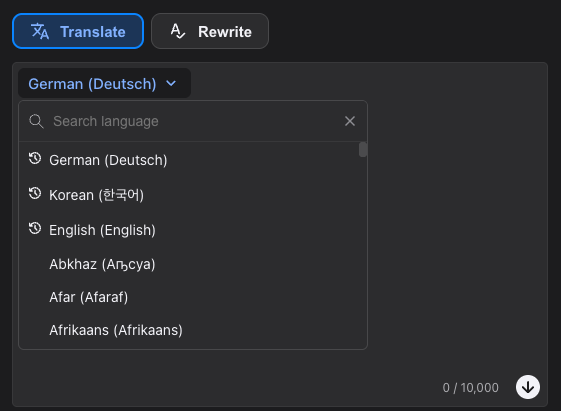
Translate and proofread text directly on your screen. No browser tabs, no external editors — just fix sentences where they appear.
Select any text and press a shortcut. textBoi rewrites it instantly, so you stay focused and continue writing without interruption.
Use textBoi in emails, documents, messengers, PDFs, and more. It works across apps on macOS and Windows — not just the browser.
Translate, proofread, and rewrite with a single shortcut. No need to switch between translation tools and grammar checkers.
Select any text and press Ctrl+C+C (Windows) or Cmd+C+C (Mac) to instantly translate or proofread using AI.
Use Ctrl+Enter (Windows) or Cmd+Enter (Mac) to apply the result inline — one step, no app switching.
TextBoi supports over 150 languages, offering 5 times the language coverage of DeepL.
Powered by GPT-5, 4.1 and 4o, it delivers smarter, more accurate translations that adapt to context.
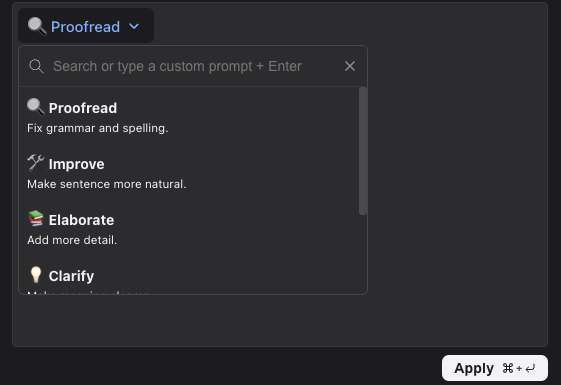
Proofread – Fix grammar, spelling, and punctuation errors,
Improve – Make your writing more fluent and natural,
Shorten – Make your sentences more concise and to the point,
Elaborate – Add detail and expand on your ideas,
And more – including a custom prompt option for full control.
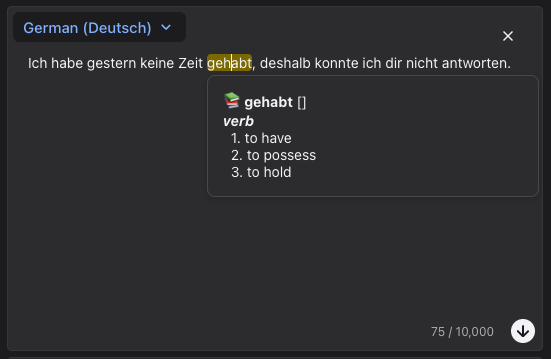
Click any word in the translated result to instantly see a pop-up dictionary definition
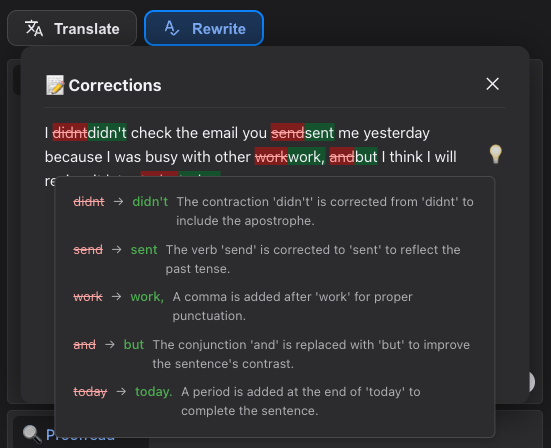
See exactly what's changed with highlighted edits.
Click the lightbulb icon to view AI-powered explanations for each correction — clear, sentence-specific, and tailored to your language.
Use TextBoi's AI writing tools directly in your browser — translate, proofread, and rewrite without leaving the page.
Awaiting Chrome Web Store approval
Real feedback from users around the world

James H.
University Student
TextBoi helped me proofread essays and translate citations instantly. The hotkey workflow is far more convenient than other writing assistants.

Marcus K.
Software Engineer
The dictionary popup and correction explanations are extremely useful. I use it daily for emails and documentation.

Alex R.
Freelancer
Super lightweight, fast, and accurate. Having GPT-powered correction inside a desktop app is a productivity game changer.

Sophie L.
Content Marketer
I no longer break my writing flow. TextBoi feels like a native part of my workflow across all apps.

Daniel P.
Graduate Researcher
Perfect for academic writing. Translating and fixing sentences inline saves me a huge amount of time.

Emily C.
Startup Founder
Clean UI, instant response, and very affordable. Easily replaces multiple tools I used before.
Start free. Upgrade when you need more.
Enough for daily use
Use it all day, every day
Cancel anytime. You'll keep access until the end of your current billing period.
Download free and try it in 30 seconds.
No credit card required
Built by a solo founder
Let's connect on X
